Configuring the Fanuc OT CNC control for DNC data transmission requires precise serial port parameter settings. Proper alignment of baud rate, I/O channel, and handshake protocols—choosing between software flow control (XON/XOFF) or hardware flow control (RTS/CTS)—is critical to maintaining stable communication between your PC and the machine tool. Ensuring these parameters match correctly is essential for preventing transmission parity errors, buffer overflows, and achieving a reliable, uninterrupted drip-feed operation during complex part processing. If you experience communication time-outs, verify that your cables meet the required pinout specifications for the selected handshake mode and ensure your PC COM port settings mirror the control parameters exactly.
More information about the ALARM 085 (Parity/Communications Error) can be found here
More information about the RS232-Port and the ALARM 086 (DR SIGNAL OFF / READER NOT READY) can be found here
More information about the ALARM 087 (Buffer Overflow) can be found here
| Parameter | Value | Comments |
|---|---|---|
| 0002 | 0000 0001 | |
| 0552 | 9 (Baud Rate) | |
| - | 6 = 300 / 7 = 600 / 8 = 1200 / 9 = 2400 / 10 = 4800 / 11 = 9600 | |
| TV On/Off | 0 = Disabled | |
| Punch Code | 1 = ISO | |
| I/O Channel | 0 | |
Drip Feed: Enable parameter G127.5. Select the Auto/DNC mode on the control, press Cycle Start, and initiate the data transmission from your PC.
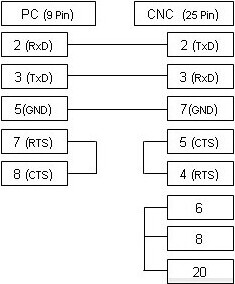
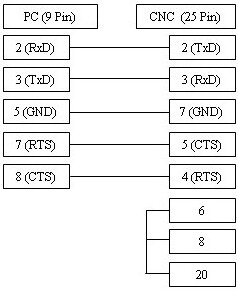
The cable illustrated above is the most commonly used configuration and supports XON/XOFF (DC1/DC3) software flow control. If your CNC machine is configured for RTS/CTS (hardware) flow control, please refer to the alternative connection diagram provided below.