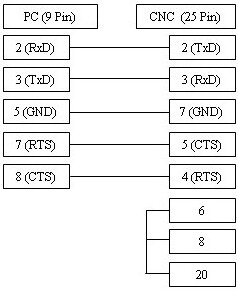
The Anilam Crusader CNC control requires precise serial configuration to ensure seamless data transmission between your PC and the machine. By correctly setting the AUX parameters for baud rate, parity, and flow control, you establish stable DNC communication. Ensure the cable pinout matches your machine's handshake requirements (Xon/Xoff or Hardware Handshake) to prevent transmission errors, parity mismatches, or buffer overflows. Frequent issues such as intermittent timeouts or character loss are often resolved by aligning the baud rate precisely and ensuring the flow control method—software (DC1/DC3) vs. hardware (RTS/CTS)—is identical on both the control and the workstation software to avoid data corruption during the DNC transfer process.
| Parameter | Value | Comments |
|---|---|---|
| Group 1 | Aux 2767 | 7 Data bits |
| Group 2 | Aux 2772 | Even Parity |
| Group 3 | Aux 2784 | Baud Rate 1200 |
| Group 4 | Aux 2790 | No Flow Control |
| Group 5 | Aux 2700 | Send to PC |
| Group 5 | Aux 2701 | Receive From PC |
Cable Diagrams and Notes
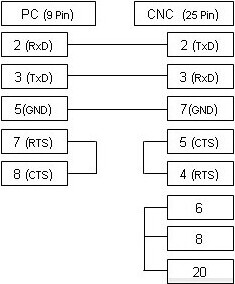
The cable illustrated above is the most commonly used variant and supports xOn/xOff (DC1/DC3) flow control. If your CNC machine is configured for RTS/CTS (hardware) flow control, please refer to the alternative wiring diagram below, which typically supports both methods of communication.